Flocus vs Fwocus: Which Aesthetic Focus Dashboard Should You Use in 2026?
Dr. Leo Maren · Co-founder of Fwocus · Behavioural scientist··6 min read
In short
Flocus and Fwocus are both aesthetic focus dashboards in the browser. Both give you calm scenes, a Pomodoro timer, ambient sounds and tasks.
Price: Flocus Plus is $5 a month billed yearly ($60). Flocus lifetime is $99 until November 30, 2026, then $149. Fwocus Pro is $19.99 once, with no subscription.
Free plan: Fwocus gives you tasks with no 3-task limit, a notepad, sounds and cloud sync for free. In Flocus, the notepad and sync need Plus.
My verdict: choose Fwocus for most students. Choose Flocus if you want to connect your own Spotify, Apple Music or SoundCloud playlists and you are happy to pay for Plus.
I checked the Flocus website, pricing page and help center on November 3, 2026. I did not take prices from review sites, because those go out of date fast. Both screenshots on this page are from the same day.
I build Fwocus, so I have a bias. To keep this fair, both apps get the same spec card and the same table. Where Flocus does something better, I say so. I scored both apps on four criteria:
LooksScenes, themes, and how calm the screen feels during a long session.
Focus toolsTimer modes, tasks, notes and stats next to the timer.
Free valueWhat the free plan includes with no trial and no card.
Ease of startThe steps between opening the app and the first session.
My short take: the two apps look equally good. Fwocus gives you much more for free, and its paid plan costs $19.99 once. Flocus is the better pick only if you need its music connections and you will pay for Plus.
Flocus vs Fwocus: the 5 differences that matter
On the first screen, the two apps look alike. Each one has a scene, a timer, sounds and a task list. The differences show up in the second week of daily use:
Price. Flocus Plus is $60 a year at the early-bird price. Flocus lifetime is $99 until November 30, 2026, and $149 after that. Fwocus Pro is $19.99 once.
The free plan. Free Flocus gives you 3 tasks at a time and stats for one day. Free Fwocus has no 3-task limit, and it includes a notepad, sounds and cloud sync.
Your own background. In Flocus, uploads and YouTube video themes need Plus. In Fwocus, one custom background is free when you sign in.
Devices. Flocus says it has no app for iOS or Android, and it is made for desktop and tablet. Fwocus runs in any browser, and that includes your phone.
Music. This is where Flocus wins. With Plus, you can connect your own Spotify, Apple Music, YouTube or SoundCloud playlists.
One more fact to know before you pay. The Flocus terms say all purchases are final and non-refundable.
Flocus and Fwocus, one by one
Each app gets the same spec card: price, who it is for, free plan limits, and its key edge. Then I explain where each one is strong.
Fwocus: Best aesthetic dashboard for most students
FwocusAesthetic Pomodoro timer and focus dashboardfwocus.com
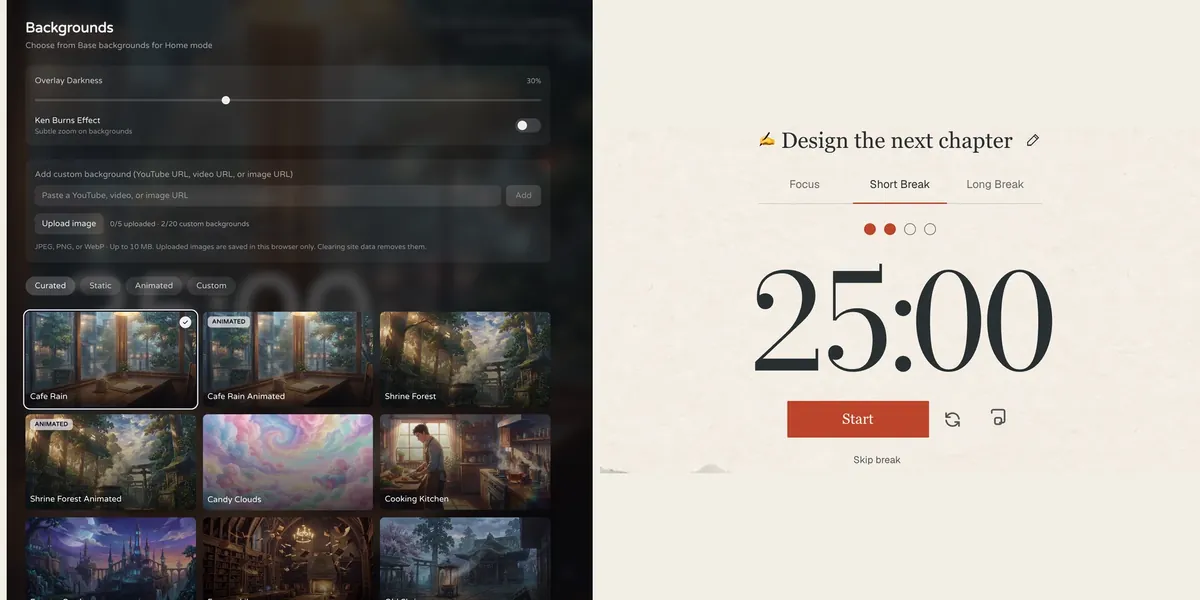
Fwocus: the background picker (left) and the Pomodoro timer (right).
Price
Free plan, or Pro for $19.99 once. No subscription.
Best for
Students who want scenes, tasks, notes, sounds and stats in one calm tab.
Free tier limits
Generous: timers, tasks, notepad, sounds and music tools, cloud sync and one custom background are free. Pro adds paid themes, full focus history and up to 20 custom backgrounds.
Key edge
Scenes, tasks, notes, sounds and focus stats in one tab, with more in the free plan. Pro is $19.99 once, with no subscription.
Fwocus is the app I build. It is an aesthetic Pomodoro timer and focus dashboard in one browser tab. You choose a scene, set your focus and break lengths, and start.
The part I spent the most time on is the backgrounds. There are more than 60, and some are animated, such as Cafe Rain and Shrine Forest. A darkness slider keeps the timer readable on bright scenes. Next to the classic Pomodoro, you can use other timer types, such as 52/17 and Animedoro.
The biggest difference from Flocus is the free plan. Tasks, the notepad, ambient sounds, music tools and cloud sync are all free. The task list shows when you will finish if you keep your current pace. Pro adds paid themes, your full focus history, and up to 20 custom backgrounds. It costs $19.99 once, with no subscription.
Where Fwocus beats Flocus:
Tasks with time estimates and a finish time, with no 3-task limit, for free
A notepad next to your timer, for free
Cloud sync, so your setup follows you to each device, for free
Your own background image, one at a time, for free
It runs in your phone's browser, as well as on a laptop
Full focus history with Pro, for $19.99 once instead of $60 a year
Results from a Fwocus student: from 9 to 26 focused hours a week
Weekly focus time of a second-year nursing student, before and after moving study sessions to Fwocus (Aug to Oct 2026)
9h → 26hfocus a week
41 dayslongest streak
4.6sessions a day
“I stopped fighting the timer. I open my café scene, pick one task, and the hours add up on their own.”Second-year nursing student, using Fwocus since August 2026
Getting started: sign in with Discord or an email link, and your setup syncs across your devices. Want to try a session first? Open the free aesthetic timer on this site. It needs no sign-up.
Flocus: Polished dashboard, best if you pay for Plus
FlocusAesthetic focus dashboard in the browserflocus.com
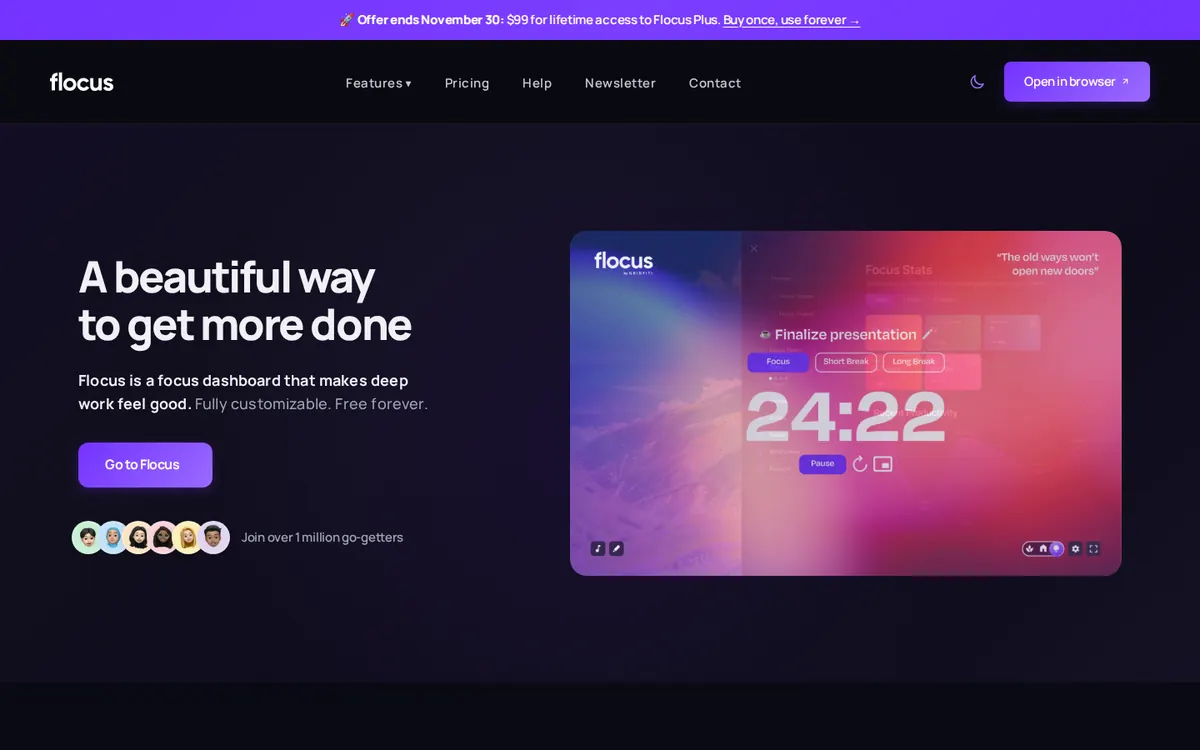
flocus.com on November 3, 2026, with the lifetime offer banner at the top.
Price
Free plan. Plus is $5 a month billed yearly ($60), with a 7-day trial. Lifetime is $99 until November 30, 2026, then $149.
Best for
People who want a polished aesthetic dashboard and pay for Plus.
Free tier limits
Up to 3 tasks at a time, one-day stats, and a limited set of themes and sounds. The notepad and cross-device sync need Plus.
Key edge
Plus connects your own Spotify, Apple Music, YouTube or SoundCloud playlists.
Flocus is an aesthetic focus dashboard from Gridfiti Inc., a company in Toronto. It runs in the browser, and its help center says it is made for desktop and tablet. The timer is free, with no sign-up and no ads.
The look is very good. Themes go from animated worlds to real places and simple gradients. The timer has four modes: Pomodoro, Countdown, Stopwatch and Animedoro. You can layer focus sounds such as brown noise with ambient sounds such as rain or a campfire.
The free plan is where it gets tight. You get 3 tasks at a time, stats for one day, and a limited set of themes and sounds. Plus unlocks the rest for $5 a month billed yearly, with a 7-day trial for first-time users. Lifetime access is $99 until November 30, 2026, and $149 after that.
Where Flocus is strong:
Your own Spotify, Apple Music, YouTube or SoundCloud playlists, with Plus
YouTube videos as your background, with Plus
A flip clock timer and a clear mode, with Plus
A free timer with no sign-up and no ads
The catch: the notepad, cross-device sync and weekly stats all need Plus. Flocus also stores streaks per browser, so they reset if you clear your browser data. If the look is what you like, Fwocus gives you the same calm screen for much less.
Flocus vs Fwocus: side-by-side comparison
The same six facts for each app, checked on November 3, 2026.
Feature
Fwocus
Flocus
Free plan
✓ Timer, tasks, notepad, sounds, sync
✓ Timer, 3 tasks, 1-day stats
Paid from
$19.99 once
$5/mo yearly; $99 lifetime
Backgrounds
60+, some animated
Themes; own and YouTube with Plus
Tasks & stats
✓ Tasks with finish time, notepad, stats
~ Full tasks and stats with Plus
Platforms
Web, any device
Web
Best for
A full aesthetic dashboard
A polished dashboard, with Plus
Overall scorecard
Stars on the four criteria from my method. Five stars means the better app of the two, not a perfect app.
Criterion
Fwocus
Flocus
Looks
★★★★★
★★★★★
Focus tools
★★★★★
★★★★★
Free value
★★★★★
★★★★★
Ease of start
★★★★★
★★★★★
What Flocus and Fwocus cost over time
A monthly price looks small. A study habit lasts for years, so I added up what each plan costs as time goes on. These are the prices on November 3, 2026:
Fwocus Free: $0, for as long as you use it.
Fwocus Pro: $19.99 once. The price stays the same after one year, two years or five.
Flocus Plus: $60 in the first year, $120 after two years, and $180 after three, at the early-bird price.
Flocus lifetime: $99 until November 30, 2026, then $149.
Flocus Plus costs three times as much as Fwocus Pro in its first year alone. Flocus lifetime costs about five times as much, and more after the offer ends.
How to switch from Flocus to Fwocus
Your routine matters more than the app. When I moved my own sessions between tools while we built Fwocus, I lost the first week each time because I set things up during study time. Do the setup once, before your next session:
Copy your timer lengths. Open Flocus settings and write down your focus, short break and long break minutes. Set the same numbers in Fwocus.
Pick one scene and keep it. A scene works as a cue to start. Changing it every day removes the cue.
Move only today's tasks. Do not copy your whole backlog. Add the three tasks you want to finish today.
Run one full session before you cancel. If you pay for Flocus Plus, keep it until Fwocus has carried you through a normal study day.
Flocus or Fwocus: which should you choose?
You want the most complete dashboard for the least money → FwocusScenes, sounds, tasks, a notepad and cloud sync are free. Pro costs $19.99 once. This is the pick for most students.
You study on your phone as well as your laptop → FwocusFwocus runs in any browser, and your setup syncs for free. Flocus is made for desktop and tablet.
You need your own Spotify or Apple Music playlists in the app → FlocusFlocus Plus connects Spotify, Apple Music, YouTube and SoundCloud playlists. Budget $60 a year or a lifetime payment.
You already own Flocus lifetime → FlocusYou paid once, and Flocus purchases are non-refundable. Stay with it unless you need to study on your phone.
More study timer comparisons
Still weighing your options? Each guide below tests one app on the same four criteria as this one.
Flocus alternatives: 7 aesthetic dashboards ranked if Flocus isn't quite right
For most students, yes. Both apps have calm scenes, a Pomodoro timer, sounds and tasks. Fwocus puts tasks with no 3-task limit, a notepad and cloud sync in the free plan, and Pro costs $19.99 once. Flocus is better if you want to connect your own music playlists.
Is Flocus free?
Flocus has a free plan with no card. It includes the focus timer, up to 3 tasks at a time, one-day stats, and a limited set of themes and ambient sounds. The notepad, cross-device sync and full stats need Flocus Plus.
Which is cheaper, Flocus or Fwocus?
Fwocus. Its free plan covers more, and Fwocus Pro is $19.99 once, with no subscription. Flocus Plus is $5 a month billed yearly ($60). Flocus lifetime is $99 until November 30, 2026, and $149 after that.
Can I use Flocus or Fwocus on my phone?
Fwocus works in your phone's browser with no download, and cloud sync is free. Flocus says it has no app for iOS or Android. It is made for desktop and tablet.
Are Flocus and Fwocus made by the same company?
No. The names are close, but the apps are not related. Flocus is made by Gridfiti Inc. in Toronto. Fwocus is an independent app, and I am one of its co-founders.
Flocus vs Fwocus: my verdict
Both apps give you a calm, beautiful place to study. The difference is what you pay for it. Fwocus gives you scenes, sounds, tasks, a notepad and cloud sync for free, and Pro costs $19.99 once. In Flocus, the notepad, sync and unlimited tasks cost $60 a year, or $99 for lifetime. Choose Flocus only if you need your own Spotify or Apple Music playlists inside the app. For everyone else, Fwocus is the better choice.
Take action now:
Open Fwocus and sign in with Discord or an email link.
Choose a background, then set your focus and break lengths.
Add the three tasks you want to finish today, and start the first session.