StudyWithMe.io vs Fwocus: Which Aesthetic Study Timer Should You Use in 2026?
Dr. Leo Maren · Co-founder of Fwocus · Behavioural scientist··5 min read
In short
StudyWithMe.io is a free aesthetic Pomodoro timer by Gridfiti. You need no account. It has three timer modes and a Spotify player, but no tasks, notes or stats.
Fwocus is also free and starts with no account. Its free plan adds 60+ backgrounds, five timer types, tasks, a notepad, ambient sounds and streaks. Pro is $19.99 once.
My verdict:Fwocus wins for anyone who studies most days. StudyWithMe.io is fine for one quick session when you need nothing else.
On November 3, 2026, I ran a study session in each app in the same browser. I took both screenshots that day. I checked each fact on the official site, not on review sites.
Fwocus is my own product, so read this with that in mind. I used the same spec card and the same four criteria as in all our comparisons:
LooksThe scene, the timer design, and how restful the screen stays.
Focus toolsTimer types, tasks, notes and stats around the timer.
Free valueEverything you get without paying.
Ease of startThe time from opening the page to the first session.
My short take: both apps give you a calm timer for free in seconds. Only Fwocus gives you somewhere to plan the work and see what you did.
The real difference: a timer or a study desk
At first glance, the two apps look alike. Each shows a large timer on a soft scene in a browser tab. The difference shows up after a week.
StudyWithMe.io is a timer. You pick pomodoro, short break or long break, then press start. A Spotify player and a Discord button sit in the corners. There are no tasks, notes or stats, so nothing records your sessions.
Fwocus is a study desk. The timer sits next to your task list and notepad. Ambient sounds play in the background. Your focus minutes add up into today's total and your streak. Tomorrow, your tasks and notes are still there.
Both are free to start, and neither asks for an account at the door. So the choice is about what you need around the timer.
Fwocus and StudyWithMe.io: one card each
Both apps get the same spec card. Then I list what each one gives you, and where each falls short.
1. Fwocus: The aesthetic timer with a full study desk
FwocusAesthetic Pomodoro timer and focus dashboardfwocus.com
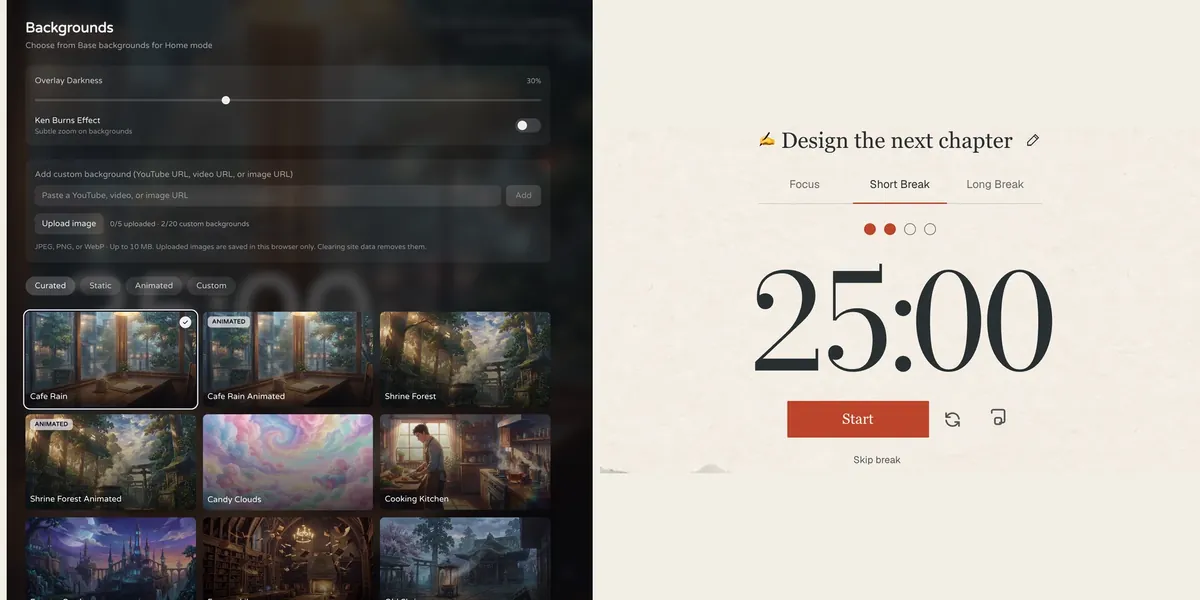
Fwocus: the background picker (left) and the Pomodoro timer (right).
Price
Free plan, or Pro for $19.99 once. No subscription.
Best for
Students who want scenes, tasks, notes, sounds and stats in one calm tab.
Free tier limits
Generous: timers, tasks, notepad, sounds and music tools, cloud sync and one custom background are free. Pro adds paid themes, full focus history and up to 20 custom backgrounds.
Key edge
Scenes, tasks, notes, sounds and focus stats in one tab, with more in the free plan. Pro is $19.99 once, with no subscription.
Fwocus is the app I build. Like StudyWithMe.io, it opens in a browser tab and you can start at once. The difference is everything around the timer.
You get more than 60 backgrounds, and some are animated, such as Cafe Rain and Shrine Forest. A darkness slider keeps the timer readable on bright scenes. Home, Focus and Ambient modes change how much is on screen.
The timer has five types: Pomodoro, 52/17, Animedoro, Countdoro and Stopwatch. Beside it are a task list, a rich-text notepad and an ambient sound mixer. Tasks take time estimates, and Fwocus shows when you will finish. On the free plan, you also see today's focus totals and your streak.
Pro adds paid themes, your full focus history and up to 20 custom backgrounds. It costs $19.99 once. There is no subscription.
What Fwocus gives you that StudyWithMe.io does not:
60+ backgrounds, some animated, and one background of your own for free
Five timer types, including 52/17 and Stopwatch for long sessions
Tasks with time estimates and an estimated finish time
A rich-text notepad that stays with your account
Layered ambient sounds, each with its own volume
Today's totals and streaks for free, plus cloud sync across devices
Results from a Fwocus student: from 9 to 26 focused hours a week
Weekly focus time of a second-year nursing student, before and after moving study sessions to Fwocus (Aug to Oct 2026)
9h → 26hfocus a week
41 dayslongest streak
4.6sessions a day
“I stopped fighting the timer. I open my café scene, pick one task, and the hours add up on their own.”Second-year nursing student, using Fwocus since August 2026
Getting started: open the app and press start. When you want your notes and stats saved, sign in with Discord or an email link. For a no-sign-up test, use our free aesthetic timer on this site.
StudyWithMe.ioFree aesthetic Pomodoro timer by Gridfitistudywithme.io
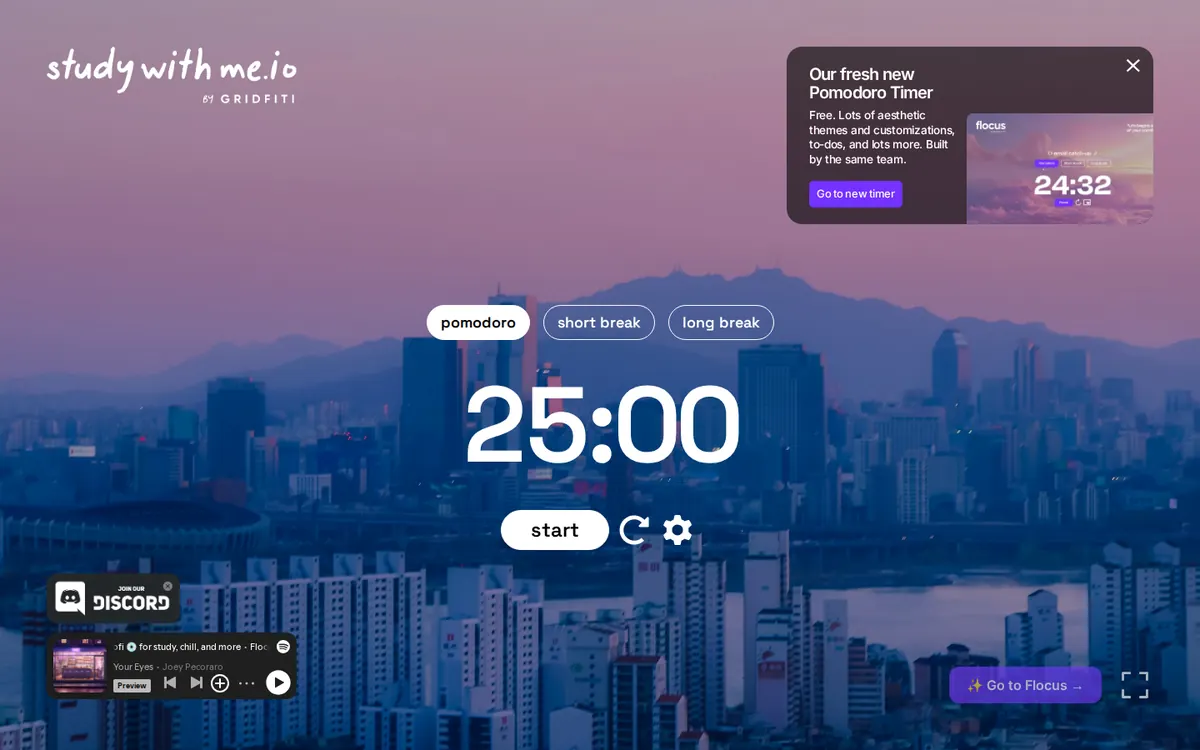
studywithme.io on November 3, 2026. The banner at the top right points to Flocus.
Price
Free.
Best for
A free aesthetic timer with no sign-up.
Free tier limits
Pomodoro, short break and long break timers on a themed scene. No tasks, notes or stats.
Key edge
Made by Gridfiti, the team behind Flocus, so the look is close. You start in one click.
StudyWithMe.io is a free aesthetic Pomodoro timer from Gridfiti, the company that also runs Flocus. You open the page, and the timer is ready at 25:00. There is no sign-up and no paid plan.
The timer has three modes: pomodoro, short break and long break. It sits on a themed scene, such as a city skyline at dusk. A settings button and a reset button sit under the timer, and a full-screen button sits in a corner. In the corners are a Spotify player and a button to join the team's Discord.
I like how fast it is. You can start a session in one click, and there is nothing to learn.
What StudyWithMe.io does well:
A free aesthetic timer with no account
Pomodoro, short break and long break modes
A Spotify player on the same screen
The catch: it is a timer and nothing more. There are no tasks, notes or stats, so you have no record of your work. A banner on the page also sends visitors to Flocus, which the team calls its "fresh new Pomodoro Timer".
StudyWithMe vs Fwocus: feature by feature
The same six facts for each app, from the official sites on November 3, 2026.
Feature
Fwocus
StudyWithMe.io
Free plan
✓ Timer, tasks, notepad, sounds, sync
✓ Full timer, no account
Paid plan
$19.99 once
None
Backgrounds
60+, some animated
Themed scenes
Tasks & stats
✓ Tasks with finish time, notepad, stats
✗ Timer only
Platforms
Web, any device
Web
Best for
A full aesthetic dashboard
A free timer, no sign-up
Scorecard
Stars on the four criteria from my method. Five stars means the best in our comparison group, not a perfect app.
Criterion
Fwocus
StudyWithMe.io
Looks
★★★★★
★★★★★
Focus tools
★★★★★
★★★★★
Free value
★★★★★
★★★★★
Ease of start
★★★★★
★★★★★
Round by round: who wins each criterion
Looks: Fwocus wins. StudyWithMe.io has a pleasant scene. Fwocus has more than 60, some animated, plus a darkness slider and your own background.
Focus tools: Fwocus wins clearly. StudyWithMe.io has three timer modes. Fwocus has five timer types, tasks with a finish time, a notepad, a sound mixer and streaks.
Free value: a draw on price, a win for Fwocus on content. Both cost $0. The Fwocus free plan simply holds much more.
Ease of start: StudyWithMe.io wins by a little. It has fewer buttons, so there is less to look at on the first visit. Fwocus also starts with no account, but it has more to explore.
Final count: Fwocus takes three rounds, and StudyWithMe.io takes one. If you study once a month, the easy start may be all you need. If you study most days, the tools matter more.
Moving from StudyWithMe.io to Fwocus
There is no account on StudyWithMe.io, so you have nothing to export. The move takes about three minutes:
Copy your lengths. Check the StudyWithMe.io settings, then enter the same focus and break minutes in Fwocus.
Pick one scene and stay with it. A fixed scene tells your brain that study time has started.
Add today's three tasks. Give each one a time estimate, and watch the finish time.
Sign in after your first session. Your streak starts counting, and your notes stay safe.
StudyWithMe.io or Fwocus: which should you pick?
You study most days and want to see your progress → FwocusTotals and streaks are free, and your tasks and notes wait for you tomorrow.
You plan your work while you study → FwocusTasks with time estimates and a notepad sit right next to the timer.
You study in long blocks, not 25-minute rounds → FwocusUse 52/17, Animedoro or the Stopwatch, on a scene you choose from more than 60.
You only need a timer for one session today → StudyWithMe.ioOpen the page and press start. No account, no setup, no extras.
More study timer comparisons
Still weighing your options? Each guide below tests one app on the same four criteria as this one.
Flocus alternatives: 7 aesthetic dashboards ranked if Flocus isn't quite right
Yes. Fwocus has a free plan with the timer, tasks, a notepad, ambient sounds, streaks and cloud sync. Pro is optional. It costs $19.99 once and adds paid themes, full focus history and up to 20 custom backgrounds.
Is StudyWithMe.io the same as Flocus?
No. They are two different apps from the same company, Gridfiti. StudyWithMe.io is a timer only. A banner on StudyWithMe.io points visitors to Flocus as the team's newer timer.
Can I use Fwocus without an account?
Yes. Open Fwocus and start a session right away. Sign in with Discord or an email link only when you want notes, focus stats and sync across your devices.
Does StudyWithMe.io track my study time?
No. StudyWithMe.io has no stats and no account, so it does not keep a record of your sessions. Fwocus shows today's focus totals and your streak for free, and your full history with Pro.
Which is better for long study sessions?
Fwocus. It has 52/17, Animedoro and Stopwatch modes for longer blocks. It also has ambient sounds and a task list to keep a long session on track. StudyWithMe.io has pomodoro, short break and long break modes.
The verdict: Fwocus for daily study, StudyWithMe.io for a quick timer
StudyWithMe.io and Fwocus both give you a calm timer for free, in a browser, with no sign-up. That is where the match ends. StudyWithMe.io stops at the timer. Fwocus adds tasks, a notepad, sounds, more scenes and a streak that grows each day. For a student who studies most days, Fwocus is the clear choice. Pro is $19.99 once if you want the extra themes and full history.