Tide vs Fwocus: Which Calm Focus App Helps You Study More in 2026?
Dr. Leo Maren · Co-founder of Fwocus · Behavioural scientist··5 min read
In short
Tide is a phone app built around nature sound, with a focus timer, sleep tracking and meditation. Tide Plus is listed from $9.99 a month or $54.99 a year.
Fwocus is a calm study dashboard in the browser: ambient sounds, 60+ scenes, five timer types, tasks, notes and stats. Pro is $19.99 once.
My verdict: for study, Fwocus wins. It does the work around the timer, and it costs less than one year of Tide Plus.
Choose Tide if you mainly want sleep sounds, meditation or breathing guides on your phone or Apple Watch.
On November 3, 2026, I checked Tide's English website, its terms and its App Store listing. I took Tide's prices from the App Store, not from review sites. The screenshots below are from the same day.
I founded Fwocus, so read this with that in mind. To keep it fair, both apps get the same spec card and the same table rows. I also note where Tide is the better app. Here are the four criteria I scored:
LooksThe screen you see while you work, and how calm it keeps you.
Focus toolsThe timer, and the tasks, notes and stats that sit next to it.
Free valueThe features you can use without paying.
Ease of startThe steps from opening the app to your first running session.
My short take: Tide is a sound app with a timer. Fwocus is a study space with sound. If your goal is study hours, the study space wins.
The core difference: a sound app or a study space
Tide and Fwocus both promise calm. They start from different places.
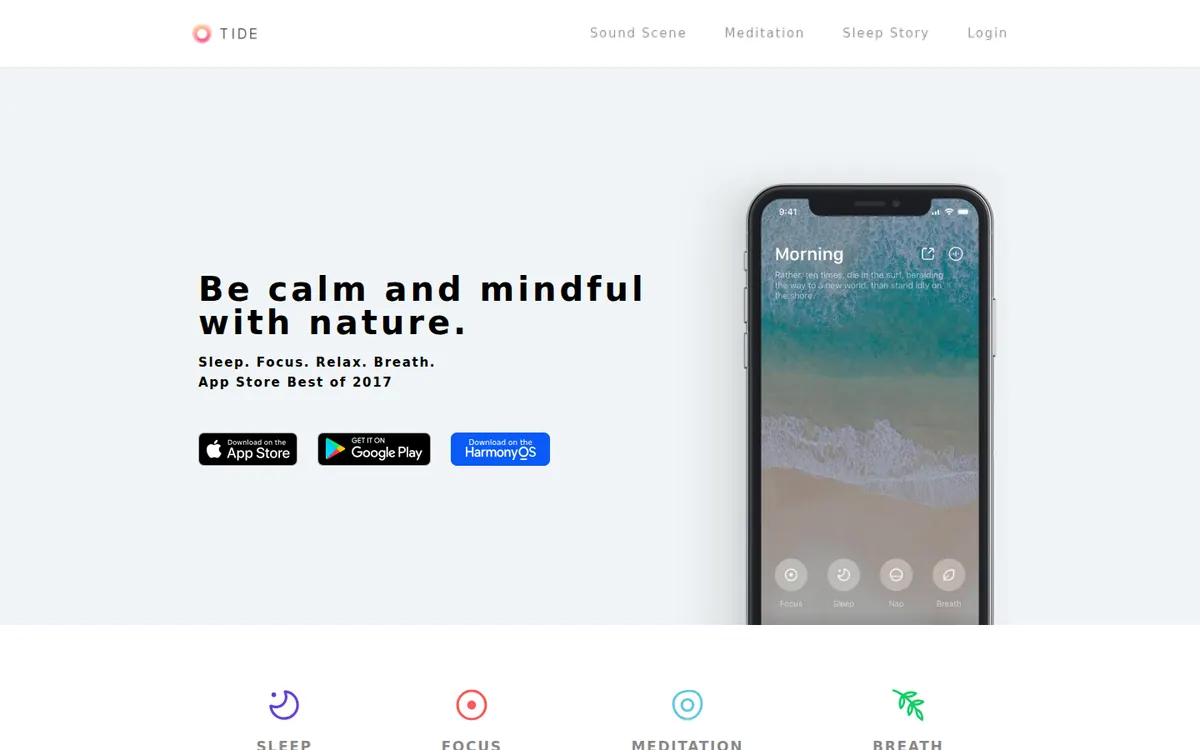
Tide starts from sound. Its site lists 174 sound scenes, such as ocean, moor and forest. The focus timer plays over those sounds. The same app also does sleep, naps, meditation and breathing.
Fwocus starts from the study session. The timer sits on a calm scene, with ambient sounds under it. Your task list, notepad and focus stats are on the same screen. You plan, focus and review in one place.
So the question is simple. Do you want something to listen to, or somewhere to work? For study, you need somewhere to work.
Fwocus and Tide, one by one
Both apps get the same spec card. Under each card, I list where that app is the stronger choice.
Fwocus: the calm study dashboard (my pick)
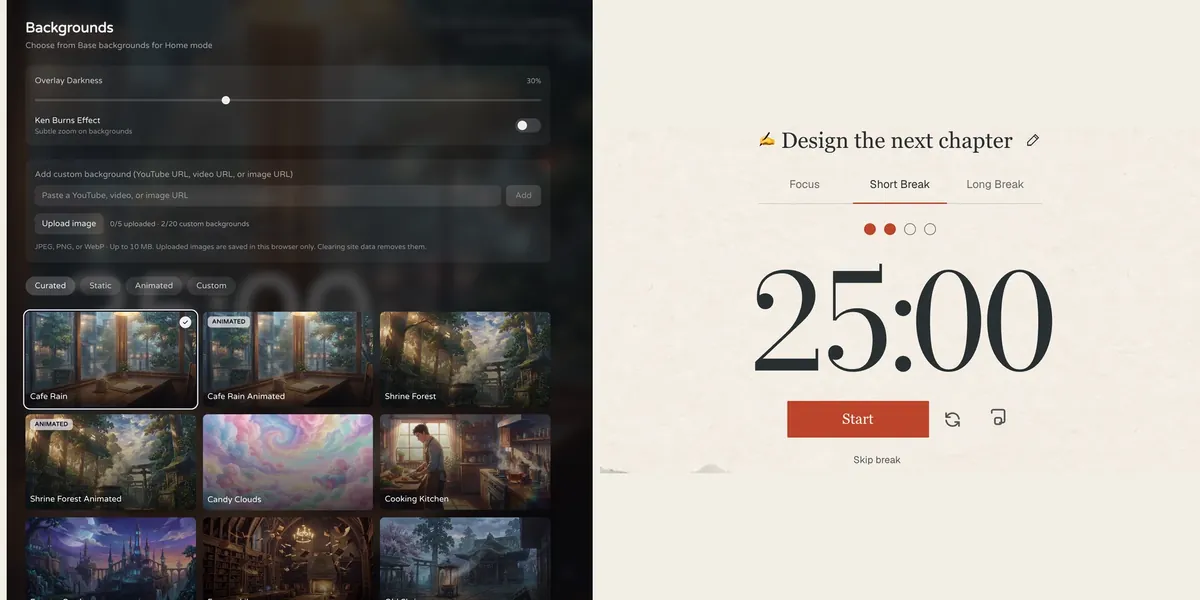
FwocusAesthetic Pomodoro timer and focus dashboardfwocus.com
Fwocus: the background picker (left) and the Pomodoro timer (right).
Price
Free plan, or Pro for $19.99 once. No subscription.
Best for
Students who want scenes, tasks, notes, sounds and stats in one calm tab.
Free tier limits
Generous: timers, tasks, notepad, sounds and music tools, cloud sync and one custom background are free. Pro adds paid themes, full focus history and up to 20 custom backgrounds.
Key edge
Scenes, tasks, notes, sounds and focus stats in one tab, with more in the free plan. Pro is $19.99 once, with no subscription.
I built Fwocus for long study days at a desk. You open it in a browser tab, pick a scene and start a timer. There is nothing to download, and the timer runs before you sign in.
For a Tide user, sound comes first. In Fwocus, you mix ambient sounds such as Cafe, Library, Snowfall and Mechanical Keyboard. Each sound has its own volume. Under the sound, you choose one of more than 60 backgrounds, and some of them are animated.
The big gain is the work around the timer. You get a task list with time estimates, a rich-text notepad, and focus stats with streaks. You also get five timer types: Pomodoro, 52/17, Animedoro, Countdoro and a stopwatch.
Most of this is free, with cloud sync. Pro adds paid themes, your full focus history and up to 20 custom backgrounds. Pro costs $19.99 one time. Fwocus has no subscription.
Where Fwocus is stronger:
Tasks with time estimates, next to the timer
A notepad for quick notes during a session
Five timer types, including 52/17 and Animedoro
60+ calm backgrounds, plus your own image
Runs in any browser, on a laptop or a phone, with nothing to install
One payment of $19.99 for Pro, instead of a yearly bill
Results from a Fwocus student: from 9 to 26 focused hours a week
Weekly focus time of a second-year nursing student, before and after moving study sessions to Fwocus (Aug to Oct 2026)
9h → 26hfocus a week
41 dayslongest streak
4.6sessions a day
“I stopped fighting the timer. I open my café scene, pick one task, and the hours add up on their own.”Second-year nursing student, using Fwocus since August 2026
What Fwocus does not do: it has no sleep tracking, no guided meditation and no Apple Watch app. If you want to see how a session feels first, try the free ocean timer or nature timer on this site. Both run with no sign-up.
Free download. The App Store lists Tide Plus from $9.99 a month or $54.99 a year.
Best for
Calm nature sounds with a focus timer on your phone.
Free tier limits
Some content needs Tide Plus.
Key edge
Focus, sleep and meditation in one app, with Apple Watch support.
Tide is made by Moreless. It pairs nature sounds with a focus timer. You can mix sounds such as rain, ocean waves, forest and fire. The timer has Pomodoro, countdown and open-ended modes, and the app keeps focus reports and a session history.
Outside study, Tide does a lot. It has sleep tracking, snore recording, a gentle-wake alarm, guided meditation and breathing guides such as 4-7-8 and box breathing. It runs on iPhone, iPad, Mac, Apple Watch and Android.
Tide is a free download with free content. Tide Plus unlocks the rest. The App Store lists it from $9.99 a month or $54.99 a year, and shows more than one price for each plan.
Where Tide is stronger:
A large sound catalog: 174 sound scenes listed on its site
Sleep tracking, snore recording and a gentle-wake alarm
Guided meditation and breathing exercises
Native apps for iPhone, iPad, Mac, Apple Watch and Android
Where Tide falls short for study: its official pages describe no task list and no notes. You also need the app installed to start. Its site says you need to download the app to get started.
Tide vs Fwocus: side-by-side comparison
The same six facts for each app, with the features down the side.
Feature
Fwocus
Tide
Free plan
✓ Timer, tasks, notepad, sounds, sync
~ Free content, more with Plus
Paid from
$19.99 once
$9.99/mo or $54.99/yr
Backgrounds
60+, some animated
Nature scenes with sound
Tasks & stats
✓ Tasks with finish time, notepad, stats
~ Focus timer, sleep, meditation
Platforms
Web, any device
iPhone, iPad, Mac, Android
Best for
A full aesthetic dashboard
Calm sounds on your phone
Scorecard
Stars for each criterion in my method. They rate the two apps against the wider group of study timers I tested, so neither app is held to a perfect score.
Criterion
Fwocus
Tide
Looks
★★★★★
★★★★★
Focus tools
★★★★★
★★★★★
Free value
★★★★★
★★★★★
Ease of start
★★★★★
★★★★★
Tide vs Fwocus: what you pay over two years
A subscription looks small each month. Over a full school career, it adds up. Here is the cost at the lowest Tide Plus prices on the US App Store:
Tide Plus, monthly: $9.99 a month, so $119.88 for one year and $239.76 for two years.
Tide Plus, yearly: $54.99 a year, so $109.98 for two years.
Fwocus Pro: $19.99 one time. The price is the same after one year, two years or five.
You do not need to pay for either app to start. Both have free content. The difference is what happens when you want more. With Fwocus, you pay once and you are done.
How to bring your Tide routine into Fwocus
Your routine is the valuable part. The app should fit around it. This setup takes a few minutes, and you do it once:
Match your sound. Note the sounds you layer in Tide. In Fwocus, mix the closest ambient sounds and set each volume low.
Match your timer. Set the same focus and break lengths you use in Tide. Keep the rhythm your brain already knows.
Choose one scene. Pick a background that feels like your Tide scene, such as Shrine Forest or Cafe Rain. Keep it for a week, so it becomes your cue to start.
Give the phone a new job. If you still like Tide for sleep, keep it for the night. During study, the phone stays out of reach.
Tide or Fwocus: which should you choose?
You study at a laptop and want tasks and notes → FwocusTimer, ambient sounds, task list, notepad and stats sit on one calm screen in your browser.
You want to pay once, not every year → FwocusPro is $19.99 one time. One year of Tide Plus is $54.99 at the lowest listed yearly price.
You want a calm screen and calm sound together → FwocusOver 60 backgrounds, some animated, with layered sounds under the timer.
You mainly want sleep sounds, meditation or breathing → TideTide has sleep tracking, guided meditation and breathing guides that Fwocus does not offer.
You want focus sounds on your Apple Watch → TideTide has native apps for Apple Watch, iPhone, iPad, Mac and Android.
More study timer comparisons
Still weighing your options? Each guide below tests one app on the same four criteria as this one.
Flocus alternatives: 7 aesthetic dashboards ranked if Flocus isn't quite right
For most students, yes. Both give you calm sound and a focus timer. Fwocus adds a calm scene, a task list, a notepad and focus stats on the same screen. Tide is the better choice for sleep and meditation.
Is Tide good for studying?
Tide is good for calm background sound. Its timer has Pomodoro, countdown and open-ended modes, and it keeps focus reports. Its official pages describe no tasks or notes, so you need a second tool to plan your study work.
Can I use Tide in a web browser?
Tide's site says you need to download the app to get started. It lists apps for iPhone, iPad, Mac, Apple Watch and Android. Fwocus runs in any web browser, with nothing to install.
Which is cheaper, Tide or Fwocus?
Fwocus. Fwocus Pro is $19.99 one time. The US App Store lists Tide Plus from $9.99 a month or $54.99 a year. Both apps also have free content.
Can I use Tide and Fwocus together?
Yes. You can keep Tide for sleep and use Fwocus for study. If you like a Tide sound during study, play it and mute the Fwocus sounds. Keep the phone face down, so it does not pull you away.
Tide vs Fwocus: my verdict
Tide is a strong sound and sleep app. For study, Fwocus is the better tool. You keep calm ambient sound, and you gain a calm scene, tasks, a notepad and stats in one browser tab. Pro costs $19.99 once, less than one year of Tide Plus. Choose Tide only if sleep, meditation or Apple Watch support matters more to you than your study setup.
Take action now:
Open Fwocus in your browser and start a timer. Sign in with Discord or an email link to keep your setup.
Mix the ambient sounds that feel closest to your Tide sounds, and choose one background.
Write today's top three tasks in the task list, then start your first focus block.