Momentum vs Fwocus: Which Calm Dashboard Helps You Study More?
Dr. Leo Maren · Co-founder of Fwocus · Behavioural scientist··5 min read
In short
The short answer: choose Fwocus if you want to study. Choose Momentum if you mainly want a calm photo in every new tab.
Price: Momentum is free, but its Pomodoro timer, site blocker and soundscapes need Plus at $39.95 a year. Fwocus is free too, and Pro is $19.99 one time.
Free plan: Fwocus gives you a Pomodoro timer, ambient sounds, tasks, a notepad and cloud sync. Free Momentum gives you a daily photo, a quote, starter to-dos and limited Focus Mode time.
Where Momentum wins: it opens in every new tab with no extra step. Plus also has a site blocker and links to tools such as Todoist and Asana.
On November 3, 2026, I read Momentum's homepage, its Plus page and its App Store listing. For Fwocus, I used our live plans. Third-party review sites often show old prices, so I skipped them.
I made Fwocus, so please read my scores with that in mind. Where Momentum does better, I say so. Both apps went through the same four checks that I use for every comparison on this site:
LooksThe background, the theme, and how calm the screen feels after an hour.
Focus toolsThe timer, tasks, notes, sounds and stats, and whether they are free.
Free valueWhat you can use every day for $0.
Ease of startThe steps from the first visit to the first focus session.
My short take: these apps solve different problems. Momentum makes each new tab calm. Fwocus makes the whole study session calm, and its focus tools are free.
The key difference: a new tab or a study tab
Momentum and Fwocus both put a calm image on your screen. They do it at different moments.
Momentum is a browser extension. It replaces the page that appears when you open a new tab. You see it many times a day, often for a few seconds, before you type an address. That is a good place for a photo, a greeting and a short to-do list.
Fwocus is a web app. You open it once and keep it open while you work. The scene, the timer, your tasks and your sounds stay on the screen for the full session. During my PhD, I did my best work at one fixed desk, not in many short visits to different rooms. A study tab works the same way.
Momentum and Fwocus, one card each
Both apps get the same spec card. Under each card, I list what the app does best.
Fwocus: Best for full study sessions
FwocusAesthetic Pomodoro timer and focus dashboardfwocus.com
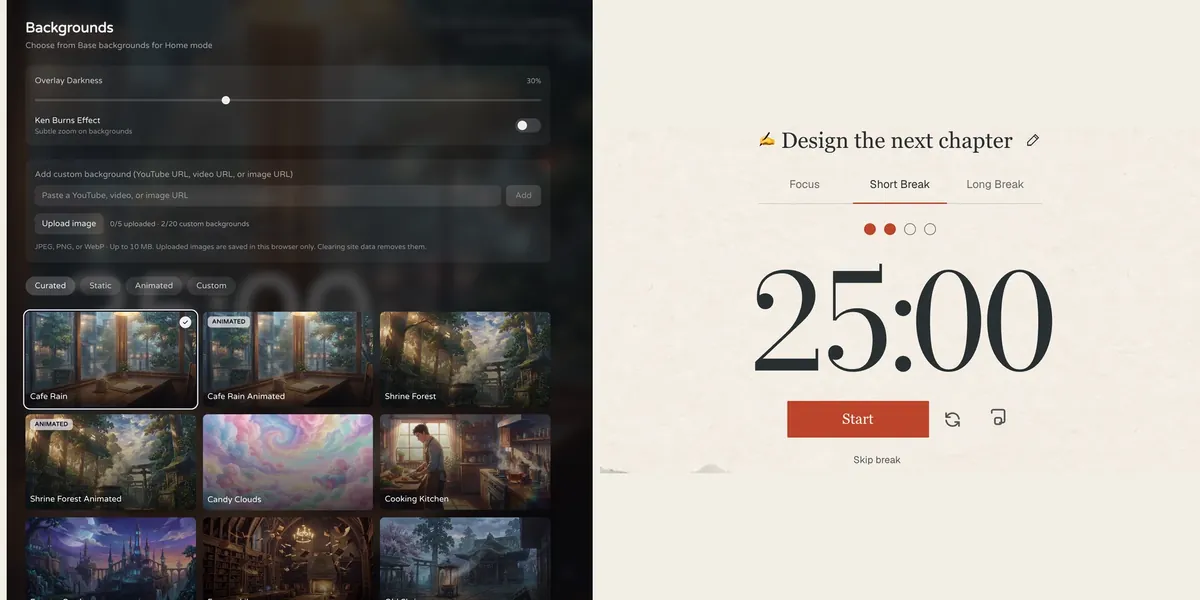
Fwocus: the background picker (left) and the Pomodoro timer (right).
Price
Free plan, or Pro for $19.99 once. No subscription.
Best for
Students who want scenes, tasks, notes, sounds and stats in one calm tab.
Free tier limits
Generous: timers, tasks, notepad, sounds and music tools, cloud sync and one custom background are free. Pro adds paid themes, full focus history and up to 20 custom backgrounds.
Key edge
Scenes, tasks, notes, sounds and focus stats in one tab, with more in the free plan. Pro is $19.99 once, with no subscription.
Fwocus is the focus dashboard I build. It runs in a browser tab on a laptop, a tablet or a phone. You choose from more than 60 backgrounds, and some of them are animated. Then you set a timer and start.
Everything you need for a session is on the same screen. The timer has Pomodoro, 52/17, Animedoro, Countdoro and stopwatch modes. Next to it, you get tasks with time estimates, a rich-text notepad and layered ambient sounds. Free accounts also see today's focus totals and streaks.
Fwocus Pro adds paid themes, your full focus history and up to 20 custom backgrounds. It costs $19.99 one time, and it is yours to keep. There is no subscription to renew.
Free in Fwocus, Plus-only in Momentum:
A Pomodoro timer with your own focus and break lengths
Ambient sounds such as Cafe, Library, Snowfall and Mechanical Keyboard
A notepad for your study notes, once you sign in
Focus stats: today's totals and streaks
A background of your own
Results from a Fwocus student: from 9 to 26 focused hours a week
Weekly focus time of a second-year nursing student, before and after moving study sessions to Fwocus (Aug to Oct 2026)
9h → 26hfocus a week
41 dayslongest streak
4.6sessions a day
“I stopped fighting the timer. I open my café scene, pick one task, and the hours add up on their own.”Second-year nursing student, using Fwocus since August 2026
Good to know: Fwocus has no site blocker, and it does not take over your new tab. Pin the tab instead, or follow my new tab guide to make it your startup page. You can test the timer first on the free aesthetic timer page, with no sign-up.
MomentumNew tab dashboard with a calm photomomentumdash.com
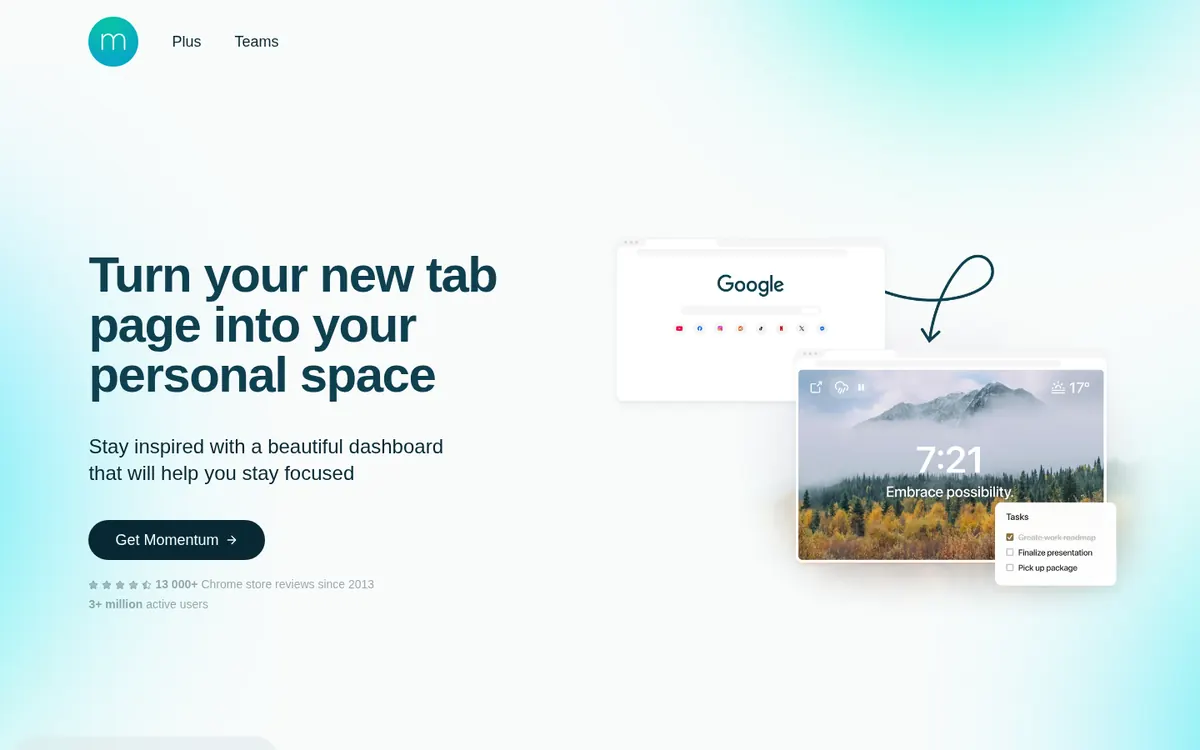
momentumdash.com on November 3, 2026.
Price
Free. Momentum Plus is $39.95 a year.
Best for
A calm new tab page that you see many times a day.
Free tier limits
Focus Mode, the Pomodoro timer, the site blocker and soundscapes need Plus.
Key edge
It is there every time you open a new tab, with no app to open.
Momentum is a new tab extension. It works in Chrome, Firefox, Edge, Safari and other Chromium browsers, and there is an app for iPhone and iPad. Each new tab shows a daily photo, the time, a quote and a mantra. During setup, you can choose to stay logged out and still use it.
The free plan also has starter productivity tools, such as a to-do list and a daily goal. It connects to your Google or Outlook calendar. Focus Mode time is limited. Momentum Plus removes that limit and adds the Pomodoro timer, soundscapes, the site blocker, Metrics and Notes with AI. Plus also links your to-dos to tools such as Todoist, Asana and Trello. On the website, Plus costs $39.95 a year, with a 30-day money-back guarantee.
What Momentum does well:
It appears in every new tab, with no extra tab to open
A site blocker, with Plus
To-do links to Todoist, Asana, Trello, GitHub and more, with Plus
A free Google or Outlook calendar connection
The catch: the free version is a calm photo, not a study tool. To time a session or play sounds, you pay $39.95 every year. Over three years, that is $119.85, against $19.99 once for Fwocus Pro.
Momentum vs Fwocus: feature table
The same six facts for both apps, taken from their official sites on November 3, 2026.
Feature
Fwocus
Momentum
Free plan
✓ Timer, tasks, notepad, sounds, sync
✓ New tab with photo and time
Paid from
$19.99 once
$39.95/yr
Backgrounds
60+, some animated
Photos; your own with Plus
Tasks & stats
✓ Tasks with finish time, notepad, stats
~ Pomodoro and blocker with Plus
Platforms
Web, any device
Browser extension, iOS
Best for
A full aesthetic dashboard
A calm new tab page
Scorecard
One to five stars on each of my four criteria. I use the same scale in every comparison on this site.
Criterion
Fwocus
Momentum
Looks
★★★★★
★★★★★
Focus tools
★★★★★
★★★★★
Free value
★★★★★
★★★★★
Ease of start
★★★★★
★★★★★
What each app costs over three years
Momentum Plus is a subscription. Fwocus Pro is one payment. The gap grows each year that you keep studying:
Total paid
Fwocus Pro
Momentum Plus (web)
After 1 year
$19.99
$39.95
After 2 years
$19.99
$79.90
After 3 years
$19.99
$119.85
In the iPhone app, Momentum Plus costs more: the App Store lists it at $46.99 a year. Both apps have a free plan, so you can try each one before you pay.
Can you use Momentum and Fwocus together?
Yes, and for some people it is the best setup. Keep free Momentum as your new tab page. It gives you the photo, the quote and a short to-do list. Then pin one Fwocus tab for your study sessions.
With this setup, you get a calm new tab and free focus tools, and you pay no subscription. If you want the paid themes and full focus history later, Fwocus Pro is a single $19.99 payment.
Momentum or Fwocus: which should you choose?
You study in long, calm sessions → FwocusThe scene, timer, tasks, notes and sounds stay on one screen for the whole session.
You want focus tools without a yearly bill → FwocusThe timer and sounds are free. Pro is $19.99 one time.
You want a photo and a quote in every new tab → MomentumMomentum is made for that moment, and the free version does it well.
You need a site blocker and links to Todoist or Asana → MomentumBoth are Momentum Plus features. Fwocus has neither of them.
More study timer comparisons
Still weighing your options? Each guide below tests one app on the same four criteria as this one.
Flocus alternatives: 7 aesthetic dashboards ranked if Flocus isn't quite right
For studying, yes. Fwocus gives you a Pomodoro timer, ambient sounds, tasks and a notepad for free, on more than 60 backgrounds. Momentum is the better new tab page, but its focus tools need Plus.
Is Momentum Plus worth $39.95 a year?
It can be, if you live in your new tab and need the site blocker or the task-manager links. If you mainly want a timer and sounds, Fwocus gives you both for free, and Pro is $19.99 once.
Does Fwocus have a browser extension like Momentum?
No. Fwocus runs in a normal browser tab at app.fwocus.com, so there is nothing to install. You can pin the tab, set it as your startup page, or open it in your phone's browser.
Does Momentum work without an account?
Yes. During setup, you can choose to stay logged out and use the free dashboard. The Pomodoro timer is a Plus feature, so it needs a paid account. In Fwocus, you can start a timer with no account and sign in only for notes and stats.
Can I use Momentum and Fwocus at the same time?
Yes. Keep free Momentum as your new tab page, and keep one Fwocus tab pinned for study sessions. You get the photo in every new tab and free focus tools in Fwocus, with no subscription.
Momentum or Fwocus: my verdict
Momentum is a pleasant way to open a new tab. It does not become a study tool until you pay $39.95 a year. Fwocus is a study tool from the first minute, and its core is free. If you like the Momentum photo, keep the free version and pin Fwocus next to it. For most students, Fwocus is the better choice.