Pomofocus vs Fwocus: Which Pomodoro Timer Is Better for Studying in 2026?
Dr. Leo Maren · Co-founder of Fwocus · Behavioural scientist··5 min read
In short
Both apps give you a free Pomodoro timer in the browser, with tasks, time estimates and a finish time.
Fwocus wins for most students. It adds 60+ scenes, ambient sounds, a notepad and cloud sync to the free plan. Pro is $19.99 once, with no subscription.
Pomofocus wins on two points: it is the fastest to start, and its free plan includes day, week and month reports. The free version shows ads.
Choose Pomofocus if you want a plain timer and nothing else. Choose Fwocus if you want a calm place to study for hours.
On November 3, 2026, I opened both apps side by side. I checked each claim on the official sites: pomofocus.io and its terms page, and the Fwocus pricing and terms. I did not use review sites. Both screenshots are from that day.
I made Fwocus, so you should read my view with that in mind. To make it fair, both apps get the same spec card and the same table. I also say plainly where Pomofocus is better. I gave stars on four criteria:
LooksWhat you see on screen, and how calm it stays over a long session.
Focus toolsTimer options, tasks, notes, sounds and reports.
Free valueWhat the free version gives you, with no card.
Ease of startThe time from opening the page to the first session.
My short take: Pomofocus is a clean tool for short, simple sessions. Fwocus is the better place for long study days, because it adds the scene, the sounds and the notes that keep you there.
What Pomofocus and Fwocus have in common
The two apps start from the same idea. You work in focus blocks with breaks between them. Both apps let you:
set your own focus, short break and long break lengths;
add tasks and give each one an estimate;
see when you will finish today's list at your current pace;
run the timer in a browser on a laptop or a phone.
So the real question is not "which timer works". Both do. The question is what you want around the timer. Pomofocus gives you as little as possible. Fwocus gives you a full, calm study space.
Pomofocus and Fwocus, one by one
Same spec card for both apps. Under each card, I explain what the app does well and where it falls short.
Fwocus: The aesthetic study dashboard
FwocusAesthetic Pomodoro timer and focus dashboardfwocus.com
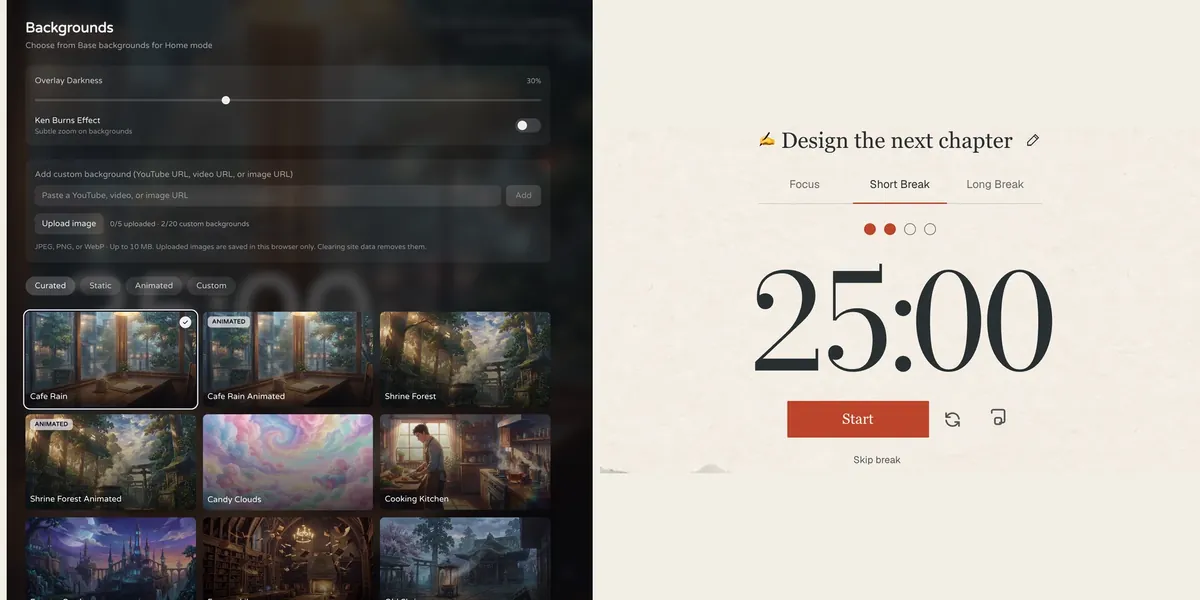
Fwocus: the background picker (left) and the Pomodoro timer (right).
Price
Free plan, or Pro for $19.99 once. No subscription.
Best for
Students who want scenes, tasks, notes, sounds and stats in one calm tab.
Free tier limits
Generous: timers, tasks, notepad, sounds and music tools, cloud sync and one custom background are free. Pro adds paid themes, full focus history and up to 20 custom backgrounds.
Key edge
Scenes, tasks, notes, sounds and focus stats in one tab, with more in the free plan. Pro is $19.99 once, with no subscription.
Fwocus is a Pomodoro timer inside a focus dashboard. You open one tab and choose a scene. The timer, your tasks, a notepad and a sound mixer sit on top of it.
The scenes are the first thing Pomofocus users notice. There are more than 60, and some of them move, such as Cafe Rain and Shrine Forest. A darkness slider makes the timer easy to read on any scene. On the free plan, you can also add one background of your own.
The task list works like the one you know. You estimate each task, and Fwocus shows your finish time. The difference is what comes with it for free: ambient sounds, music tools, a notepad and cloud sync. Pro adds paid themes, the full focus history with analytics, and up to 20 custom backgrounds. Pro is $19.99 one time. Fwocus has no monthly or yearly plan.
What you get that Pomofocus does not list:
60+ scenes, some animated, plus your own background
Ambient sounds such as Cafe, Library and Snowfall, and your own music
A notepad next to the timer
Cloud sync across your devices, on the free plan
Today's totals and streaks for free, and full history with Pro
A one-time Pro price of $19.99, with no subscription
Results from a Fwocus student: from 9 to 26 focused hours a week
Weekly focus time of a second-year nursing student, before and after moving study sessions to Fwocus (Aug to Oct 2026)
9h → 26hfocus a week
41 dayslongest streak
4.6sessions a day
“I stopped fighting the timer. I open my café scene, pick one task, and the hours add up on their own.”Second-year nursing student, using Fwocus since August 2026
Where it falls short: the full app asks you to sign in, with Discord or an email link. Pomofocus is one step faster. Also, the full day, week and month history is in Pro, not the free plan. To try a session with no sign-in, open the free aesthetic timer on this site.
PomofocusPlain online Pomodoro timer with taskspomofocus.io
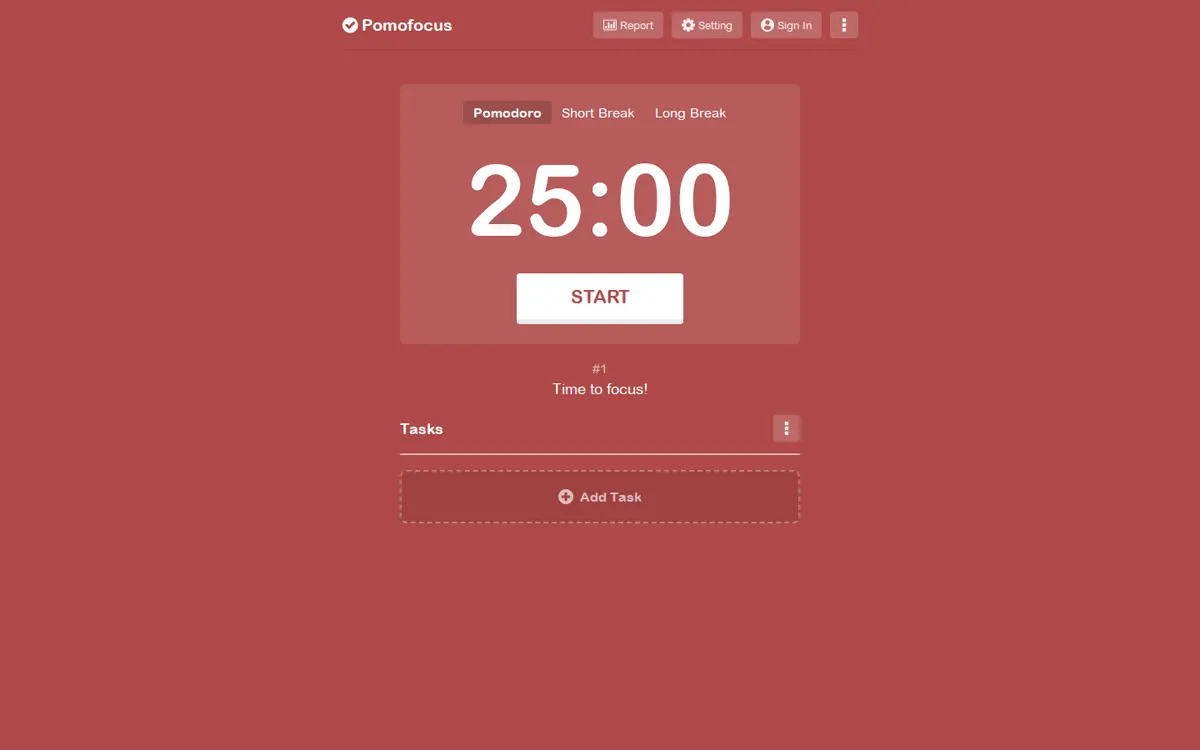
pomofocus.io on November 3, 2026.
Price
Free. Premium is a paid upgrade inside the app.
Best for
A plain timer with a task list and no setup.
Free tier limits
Up to 3 saved templates. Projects, yearly reports and CSV downloads need Premium. The free version shows ads.
Key edge
Tasks with estimated pomodoros and a finish time.
Pomofocus shows a large timer on a solid color, with a task list below it. You can use it on a desktop or mobile browser. There are also desktop apps for Mac, Windows and Linux.
In settings, you change your focus and break lengths, alarm sounds and background sounds. You can estimate pomodoros for each task and see your finish time. You can save up to 3 templates for tasks you repeat. Reports by day, week and month are free.
Premium adds projects, yearly reports, CSV downloads, more than 3 templates, a Todoist link, webhooks for apps such as Zapier and IFTTT, and no ads. The homepage shows no Premium price. The terms page describes subscriptions billed monthly or yearly, with a full refund within 7 days.
Where it falls short: the screen has no scenes, and Pomofocus lists no themes or backgrounds among its features. The free version shows ads. There is no notepad on its feature list. The site also warns that Windows may call its desktop app unsafe.
Pomofocus vs Fwocus: side-by-side comparison
Six facts, the same for both apps. A green tick means the feature is there.
Feature
Fwocus
Pomofocus
Free plan
✓ Timer, tasks, notepad, sounds, sync
✓ Timer, tasks, reports
Paid from
$19.99 once
Premium, in-app price
Backgrounds
60+, some animated
✗ Plain color
Tasks & stats
✓ Tasks with finish time, notepad, stats
✓ Tasks, reports
Platforms
Web, any device
Web, Mac, Windows, Linux
Best for
A full aesthetic dashboard
A plain timer with tasks
Scorecard
Stars on the four criteria from my method. Pomofocus beats Fwocus on ease of start. Fwocus wins on looks.
Criterion
Fwocus
Pomofocus
Looks
★★★★★
★★★★★
Focus tools
★★★★★
★★★★★
Free value
★★★★★
★★★★★
Ease of start
★★★★★
★★★★★
The four differences that matter
1. The screen
Pomofocus gives you a timer on a plain color. Fwocus gives you a scene, such as a rainy café, with the timer on top. For a 20-minute task, the plain screen is fine. For a four-hour study day, a calm scene makes it easier to stay.
2. What sits next to the timer
Both apps have tasks with estimates. Fwocus also has a notepad, ambient sounds and music tools on the free plan. With Pomofocus, you change background sounds in settings, and you need another app for notes.
3. Reports
This point goes to Pomofocus. Its free plan shows reports by day, week and month. Fwocus Free shows today's totals and your streak. The full history needs Pro.
4. Price
The Pomofocus terms describe Premium as a subscription billed monthly or yearly, and the price appears inside the app. Fwocus Pro is $19.99 one time, and you keep it. If you plan to study for years, a one-time price costs less over time.
How to move from Pomofocus to Fwocus in two minutes
Copy your numbers. Open Pomofocus settings and note your focus, short break and long break minutes. Enter the same numbers in Fwocus.
Add only today's tasks. Give each one the same estimate you used in Pomofocus. Leave the rest of your list for later.
Pick one scene. Use the same scene every day for a week. It becomes your signal to start work.
Turn on one sound. Start with a quiet sound, such as Library, at low volume.
Pomofocus or Fwocus: which should you choose?
You study for hours and want a calm place to do it → FwocusScenes, sounds, a notepad, tasks and sync in one tab, mostly free. Pro is $19.99 once.
You hate subscriptions → FwocusFwocus Pro is a one-time payment. There is no monthly or yearly plan to cancel.
You want a plain timer and the fastest possible start → PomofocusOpen the page and press start. Nothing else competes for your eyes.
You need free weekly and monthly reports → PomofocusDay, week and month reports are on the Pomofocus free plan.
More study timer comparisons
Still weighing your options? Each guide below tests one app on the same four criteria as this one.
Flocus alternatives: 7 aesthetic dashboards ranked if Flocus isn't quite right
For long study sessions, yes. Fwocus has the same kind of timer and task estimates, and adds 60+ scenes, ambient sounds, a notepad and cloud sync for free. Pomofocus is better if you want a plain timer with free weekly and monthly reports.
Is Fwocus free like Pomofocus?
Yes. The Fwocus free plan includes the timers, tasks, the notepad, sounds and music tools, free backgrounds, one custom background, today's totals and streaks, and cloud sync. Pro is an optional one-time payment of $19.99.
Does Pomofocus have aesthetic backgrounds?
No scenes, themes or backgrounds are on the Pomofocus feature list. The timer sits on a plain color. Fwocus has more than 60 scenes, and you can add your own image.
Which is cheaper, Pomofocus Premium or Fwocus Pro?
The Pomofocus terms describe Premium subscriptions billed monthly or yearly. The price shows inside the app, not on the homepage. Fwocus Pro is $19.99 one time. With Fwocus, you pay once and never again.
Can I use Pomofocus and Fwocus together?
You can, but you do not need to. Fwocus already has the timer and the task estimates. Most students who switch keep only Fwocus open, so there is one tab to look at.
My verdict: Fwocus for long study days
Pomofocus is a good timer, and it is the fastest way to start one session. But a study day is not one session. If you sit down for hours, the screen, the sounds and the notes matter. Fwocus keeps the Pomofocus basics, the timer and the task finish time, and puts them in a calm scene with sounds, a notepad and sync. Most of it is free, and Pro is $19.99 once. If you want only a plain timer for short tasks, stay with Pomofocus.
Take action now:
Open Fwocus and sign in with Discord or an email link.
Enter the focus and break lengths you used in Pomofocus.
Choose a scene, add today's tasks, and start your first session.